


If you're still manually adding managers to sheets to give them visibility over their team's items, stop. Once you start building seriously in Smartsheet, you need to start thinking of it like a database. The goal is to build things once and reference them everywhere, not rebuild the same logic across a dozen sheets.
Here are three reference tables worth setting up early.
1. Manager-Subordinate table
At its core, this table only needs two columns: one for the subordinate, one for their manager. That's it. Two columns and you can model your entire company hierarchy.
Once it exists, any sheet where a subordinate appears, like a request form or a project tracker can pull in their manager automatically using an INDEX/MATCH formula. No more manually maintaining manager fields across multiple sheets. Change a manager once in the reference table and it propagates everywhere.
If you are not familiar with INDEX/MATCH yet, Smartsheet has a decent article to get you started: 3 Ways to Link Data Across Your Sheets.
Bonus points if this table is fed automatically from your HR system. Double it if you start adding extra information like role, start date, a seniority calculation, and KPIs sourced from other sheets. You can start lean and extend as the need arises.
(The "Subordinate" label is just for clarity here. Call it "Colleague", "Employee", whatever fits your organisation's language.)
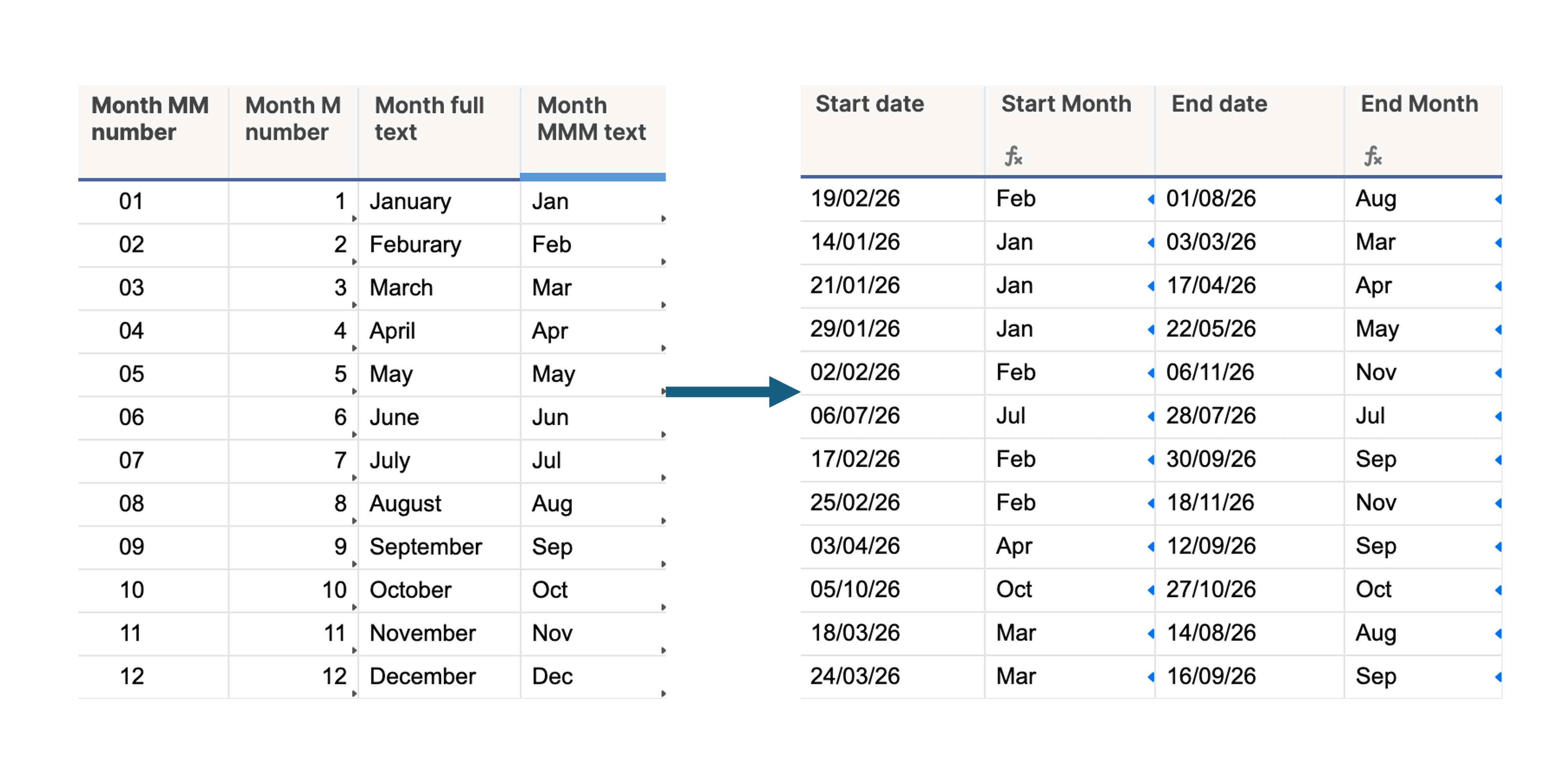
2. Months table
Simpler, but surprisingly useful if you work with dates and need to build charts or reports by month.
The problem: Smartsheet stores month numbers without leading zeros by default. Depending on what you're building, you might need 01 instead of 1, or January instead of either. Without a reference table, you end up with YEAR/MONTH formulas scattered everywhere, or worse, manual entries.
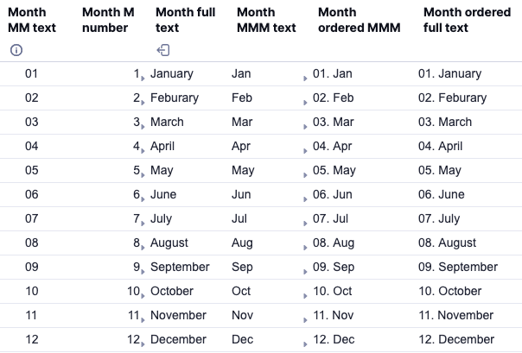
The fix is a small table with four columns:
- Month number without leading zero (Smartsheet default)
- Month number with leading zero
- Full month name
- Abbreviated month name (3 letters)
- Month number with leading zero and month name (3 letters)
- Month number with leading zero and full month name
Now an INDEX/MATCH against this table gives you whichever format you need, wherever you need it.
3. Currency conversion table
One last example is a currency conversion reference table which is common in organisations with a global footprint. The usual setup: a conversion rate per currency, per fiscal year, so all financial calculations across different regions are based on consistent, agreed-upon rates rather than live fluctuations.
A best practice I've learned along the way: add a "current year" data point per currency that uses a formula to always pull the latest fiscal year's rate. This means your dashboards and sheets that calculate based on current-year rates don't need to be updated manually at the start of each year, the reference table will handle it.
The pattern across all three is the same: build a single source of truth, reference it everywhere else. It's the difference between a Smartsheet environment you maintain and one that maintains itself.
If you need help figuring out what reference tables your organisation could benefit from, please use the form below to contact me:
