

Stop Chasing Projects: How We Automated the Entire Project Portfolio With Smartsheet Control Center

Adrien Leduc
Most teams don't have a project problem. They have a visibility problem.
You might be managing five projects, or fifty. Either way, the question is the same: do you actually know what's happening across all of them? Not what you were told in last Tuesday's standup, but right now, today?
In my experience working with operations and delivery teams, the honest answer is usually no. And it's not for lack of trying.
What the gap actually looks like
It tends to start small. A project gets kicked off before the deal is formally closed, because the client gave a verbal yes and the team doesn't want to lose time. Or a piece of custom work gets scoped and delivered because someone on the account team said it was "included." Or a project gets quietly shelved on the client side, but nobody tells delivery, so two people keep working on it for another three weeks.
None of these are catastrophic on their own. Collectively, they compound into something significant.
Professional services firms typically lose between 5 and 12% of revenue to leakage, roughly twice the rate seen in software businesses, precisely because the revenue depends on humans logging time, scoping projects, negotiating rates, and sending invoices. Every one of those human touchpoints is a potential gap. The five most common sources, ranked by share: unbilled time (40%), scope creep without change orders (25%), rate card drift (15%), fixed-fee project overruns (12%), and change-order gaps (8%). Source: https://leaksshield.com/revenue-leakage/statistics
The throughline in all of them is the same: most firms experience leakage not because they lack data, but because that data lives in disconnected systems that never reconcile in real time.
Three failure modes show up consistently:
1. No centralised project portfolio.
Without a single place to see every active project, its status, and who owns it, portfolio visibility becomes a manual exercise. Someone has to compile it, keep it current, and distribute it. That someone usually has other things to do. So the view that leadership relies on is already a week or two out of date before anyone reads it.
2. Manual data entry nobody trusts.
When project records have to be created by hand after a deal closes, things slip. There's a lag, or fields get filled in inconsistently, or the sheet gets updated in one place but not another. Once people suspect the data is unreliable, they stop using it as a source of truth and go back to chasing colleagues for updates directly. The tool becomes a burden rather than an asset.
3. Custom work delivered without written sign-off.
This is the one that directly costs money. Teams routinely deliver work beyond what was contracted, an extra workshop here, additional analysis there, and because there is no system to flag and price it, the extra effort is simply absorbed. There's no bad intent involved. The project manager didn't want to seem difficult over a small request. But those small requests, multiplied across a portfolio, represent real margin erosion.
What that actually costs you
Beyond the direct revenue impact, there are second-order costs that are harder to measure but just as real.
Stakeholders making decisions on stale data pick the wrong priorities. Resource planning based on an incomplete portfolio leads to people being overallocated on some projects and underutilised on others. And the time your senior people spend chasing status updates, consolidating spreadsheets, and maintaining separate reporting decks for different stakeholders is time not spent on delivery.
When senior consultants and project managers spend hours every week scheduling, reporting, resource planning, and chasing approvals, that time is not billable. But it represents a real cost. The more administrative overhead your team carries, the fewer hours of high-value work get to clients.
What we built, and why it's structured this way
The architecture here is deliberate. Each component addresses a specific failure mode, and they're designed to work together rather than in isolation.
The starting point is the connection between Salesforce and a structured intake sheet in Smartsheet. The moment a deal reaches a defined stage in Salesforce, whether it closes or moves to confirmed, a row is created on the intake sheet automatically. No copy-paste, no manual line creation, no lag. Smartsheet's Salesforce Connector keeps data in sync between systems so that teams don't have to enter it repeatedly, which removes the first point of failure entirely.
From that intake sheet, Control Center takes over. Control Center automates project creation, manages change, and aggregates portfolio reporting. In practice, that means the moment a row appears on the intake sheet with the right fields filled in, a project folder is provisioned automatically: the plan, the task sheet, the RACI, whatever toolkit your team needs to run that type of project. Standardised project templates automatically populate with relevant information each time a new project is initiated, which eliminates the need for manual data entry and ensures consistency across all projects.
This matters for more than efficiency. When every project is provisioned from the same blueprint, you get consistent structure across the portfolio by default. Reports work because the data is always in the same place. Rollups are reliable because every project sheet uses the same column names. You don't have to audit whether the template was followed.
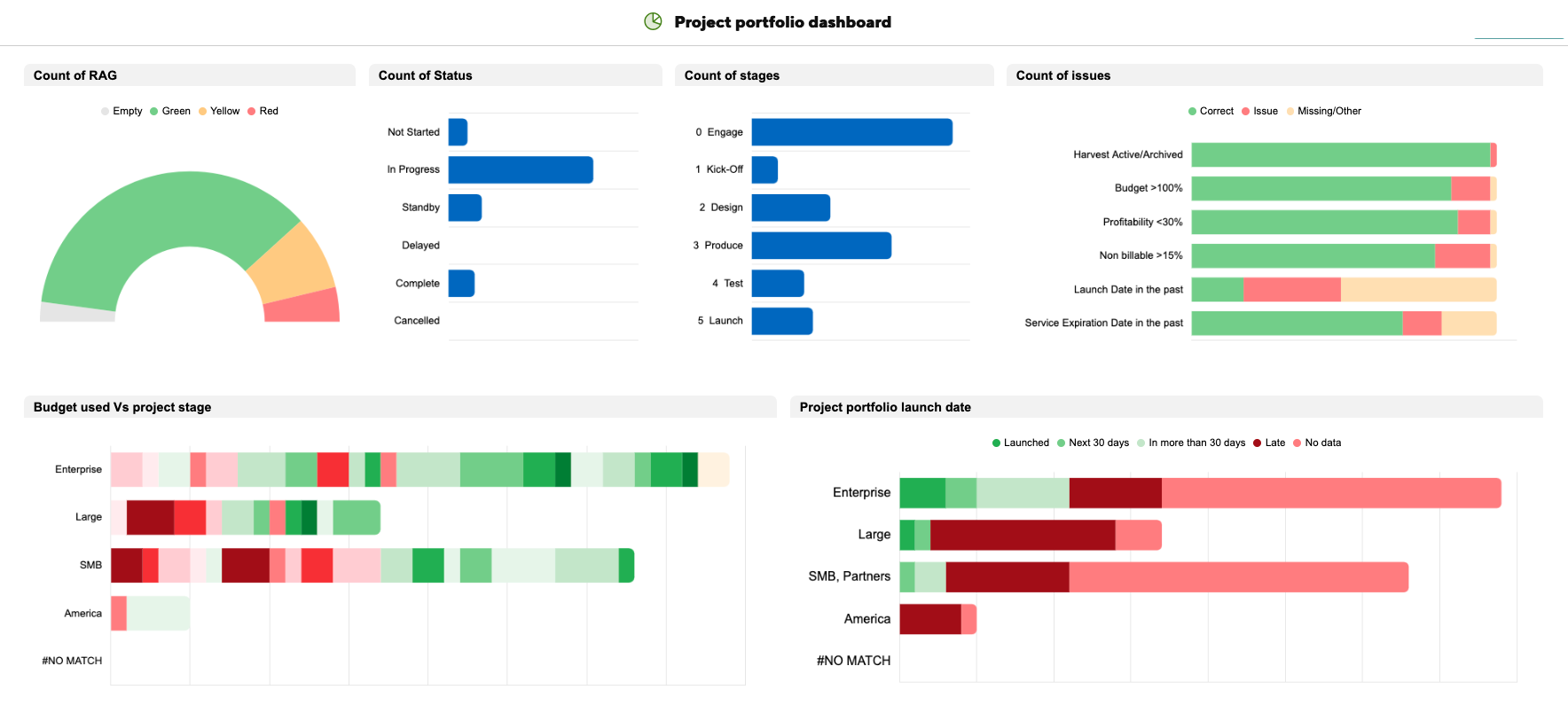
The summary sheet is the live layer on top of all of this. It aggregates key fields from every active project, and because it pulls directly from the project sheets rather than relying on anyone to update it, it reflects what's actually happening rather than what was last reported. Program reports provide scalable and efficient ways to generate portfolio-level insights by aggregating data across multiple Control Center projects.
From the summary sheet, role-filtered reports give each stakeholder exactly the view they need. A delivery manager sees their active projects and completion rates. A finance stakeholder sees sign-off status and budget flags. A resource manager sees allocation across the portfolio. Nobody is looking at data that isn't relevant to them, and nobody has to maintain a separate deck to provide that view.
The sign-off piece
This is worth its own section because it's the one that directly addresses revenue leakage on custom work.
The workflow bakes validation in before delivery begins. A custom request doesn't generate a project folder until the relevant sign-off field is completed on the intake sheet. That might be a checkbox, a linked approval, or a specific status, depending on how your team works, but the principle is the same: no record of approval, no project created.
This isn't about adding bureaucracy. It's about making the approval visible and traceable, rather than verbal and forgettable. The written record exists in the system, linked to the project, accessible to anyone who needs to see it.
And this doesn't mean exceptions can't happen, but when they do they're documented, with responsibilities established.
The outcome in practice
Once this is running, three things change:
No more unpaid custom projects. Written validation is a prerequisite for provisioning, not an afterthought. By the time work starts, the sign-off exists in the system.
Portfolio visibility without admin overhead. Relevant stakeholders can see a real-time view of the entire portfolio, scoped to their role, aggregated from the actual project data rather than a separately maintained deck. Updates don't need to be chased. The view is current because the data flows automatically.
Project completion updates itself. Progress on each project sheet rolls up to the portfolio summary automatically. A project manager marks tasks complete in their own sheet, and the portfolio view reflects it. No one has to remember to update a separate tracker.
Go Further. Automating a project portfolio is one thing, but have you considered automating your account portfolio? Discover how to Build Client-Level Dashboards at scale with Smartsheet Control Center.
Who this is for
This setup requires Smartsheet's premium apps: the Salesforce Connector and Control Center. If you already have access to both, the architecture above can be implemented on your existing environment. The configuration work is significant, but the ongoing maintenance overhead is minimal once it's running, because the system manages itself.
If you're seeing any of the patterns described here, whether it's unpaid custom work, outdated portfolio data, or too much time spent on manual updates, use the form below to tell me about your situation and I'll get back to you.
